Building a web application that can grow with your user base isn’t a luxury—it’s a necessity. Whether you’re a developer tasked with the next release or a CTO planning the roadmap for years to come, understanding how to design a scalable web application architecture will keep performance steady, costs predictable, and your team focused on innovation.
Why Scalability Matters
Scalability is the ability of a system to handle increased load without compromising performance or stability. In today’s cloud‑first world, traffic spikes can come from marketing campaigns, viral content, or seasonal demand. A well‑architected system reacts gracefully, preserving user experience and protecting revenue.
Key Benefits
- Cost efficiency: Pay only for the resources you need.
- Reliability: Reduce downtime during peak loads.
- Future‑proofing: Add features without a complete redesign.
- Competitive edge: Faster response times improve conversion rates.
Core Principles of Scalable Architecture
Before diving into specific technologies, master these foundational concepts.
1. Loose Coupling
Components should interact through well‑defined interfaces (APIs, message queues). Loose coupling allows you to replace or scale parts independently.
2. Stateless Services
Design services that do not store session data locally. Store state in external stores (Redis, databases) so any instance can serve any request.
3. Horizontal Over Vertical
Prefer adding more nodes (horizontal scaling) to increasing CPU/RAM on a single server (vertical scaling). Horizontal scaling aligns with cloud auto‑scaling groups.
4. Asynchronous Processing
Offload long‑running tasks to background workers or event streams. This keeps request latency low and improves throughput.
Designing the Backend Architecture
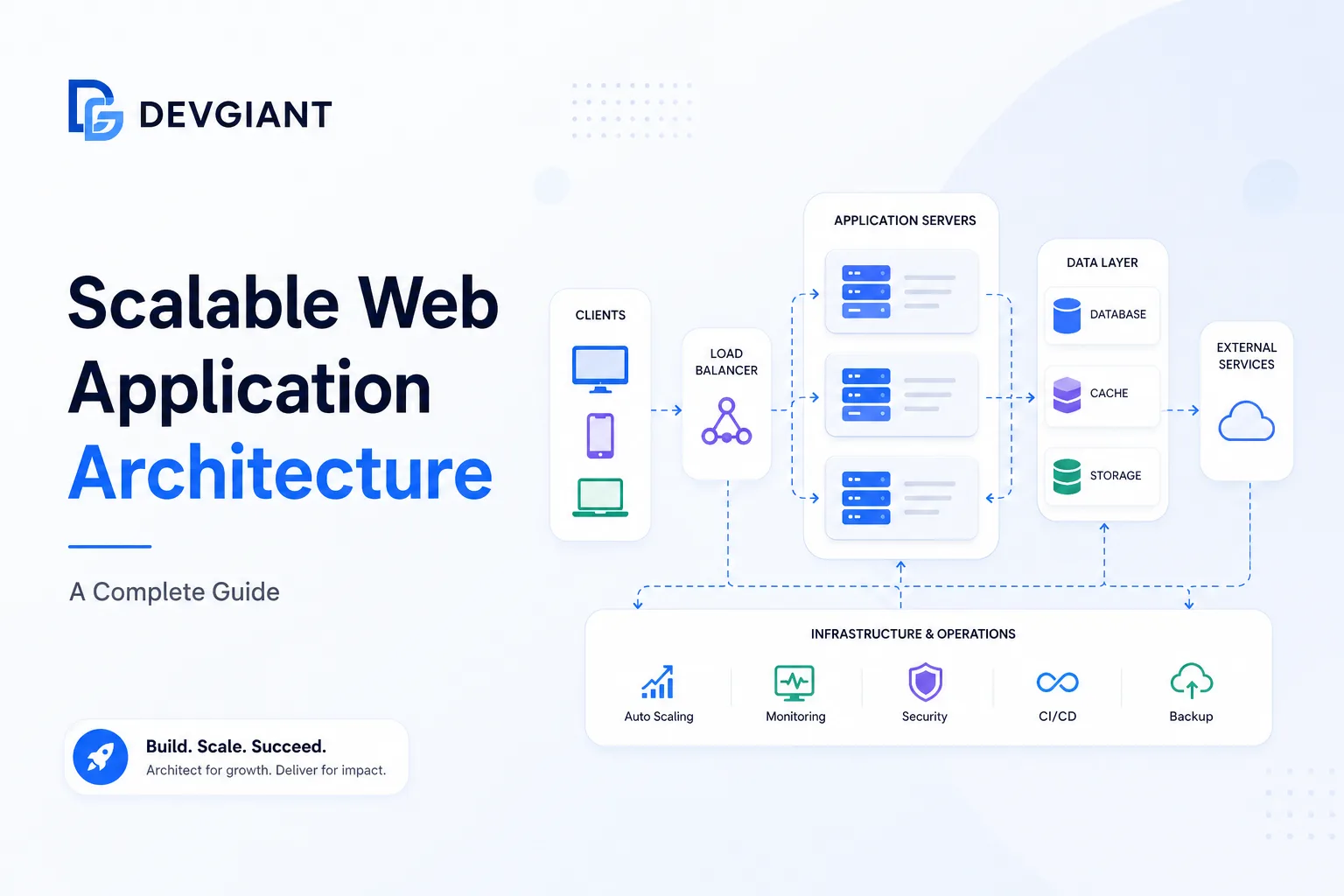
The backend is the heart of any scalable web app. Below is a reference architecture that balances performance, maintainability, and cost.
Layered Overview
- API Gateway: Single entry point, handles routing, SSL termination, and rate limiting.
- Microservices / Bounded Contexts: Small, focused services written in Node.js or other languages.
- Message Broker: Kafka, RabbitMQ, or AWS SQS for event‑driven communication.
- Data Stores: Polyglot persistence – relational DB for transactions, NoSQL for flexible schemas, and a cache layer.
- Observability Stack: Metrics (Prometheus), tracing (Jaeger), logging (ELK).
Choosing the Right Data Store
Match the store to the access pattern:
- Transactional data: PostgreSQL or MySQL with read replicas.
- Document‑oriented data: MongoDB or DynamoDB for flexible schemas.
- Time‑series data: InfluxDB or Prometheus for metrics.
- Cache: Redis or Memcached to reduce DB load.
Node.js Scalability: Practical Tips
Node.js is popular for its non‑blocking I/O, but scaling it correctly requires attention to a few details.
Cluster Mode
Use the built‑in cluster module or a process manager like PM2 to spawn multiple worker processes, one per CPU core.
Stateless Design
Store session data in Redis, not in‑memory, so any worker can serve any request.
Connection Pooling
Maintain a pool of database connections per worker to avoid exhausting resources.
Graceful Shutdown
Implement signal handling (SIGTERM) to finish in‑flight requests before terminating a worker.
Caching Strategies for High Throughput
Effective caching reduces latency and database pressure.
1. HTTP Edge Cache
CDNs (CloudFront, Cloudflare) cache static assets and even dynamic HTML for short periods.
2. Application‑Level Cache
Cache expensive query results in Redis with appropriate TTLs.
3. Database Query Cache
Enable query caching where supported (e.g., MySQL query cache) for read‑heavy workloads.
Asynchronous Processing & Messaging
Decouple heavy work from the request‑response cycle.
Event‑Driven Architecture
Publish domain events (e.g., OrderCreated) to a broker. Consumers handle tasks such as email notifications, inventory updates, or analytics.
Background Workers
Use libraries like Bull (Redis‑based) or RabbitMQ consumers to process jobs reliably.
Monitoring, Alerting, and Auto‑Scaling
Visibility is essential for proactive scaling.
Metrics to Track
- CPU & memory per instance
- Request latency (p95, p99)
- Queue depth in message broker
- Cache hit‑ratio
- Error rates (4xx, 5xx)
Auto‑Scaling Policies
Configure cloud auto‑scaling groups based on CPU utilization and queue depth. Combine horizontal pod autoscaling (Kubernetes) with custom metrics for fine‑grained control.
Deployment Patterns that Support Scale
Choose a deployment model that matches your team’s maturity and the product’s complexity.
Blue‑Green Deployments
Run two identical environments; switch traffic after verification. Reduces risk and provides instant rollback.
Canary Releases
Gradually route a small percentage of traffic to the new version, monitor metrics, then increase rollout.
Infrastructure as Code (IaC)
Use Terraform or CloudFormation to version‑control your entire stack, ensuring reproducible environments.
Real‑World Example: Scaling an E‑Commerce Platform
Consider an online store that expects a 5× traffic surge during a flash sale.
- API Gateway: AWS API Gateway with throttling limits.
- Microservices: Node.js services for catalog, cart, and checkout, each running in ECS with 4‑core containers.
- Message Broker: Amazon SQS for order events; Lambda consumers for inventory updates.
- Data Layer: Aurora MySQL read replicas for catalog queries; DynamoDB for session storage.
- Cache: Redis (Elasticache) for product details and price lookups.
- Observability: CloudWatch dashboards + Grafana for real‑time alerts.
During the sale, auto‑scaling groups added 3 additional containers per service, while the SQS queue depth triggered extra Lambda workers. The result: sub‑200 ms latency and zero downtime.
Internal Resources
Looking for hands‑on assistance? Our services include architecture reviews, performance tuning, and managed cloud deployments. For a deeper dive into custom solutions, explore our consulting services. Ready to start? Contact us today.
Frequently Asked Questions
What is the difference between vertical and horizontal scaling?
Vertical scaling adds more CPU, RAM, or storage to a single server. Horizontal scaling adds more server instances behind a load balancer. Horizontal scaling is generally more resilient and aligns with cloud auto‑scaling.
How can I make a Node.js service stateless?
Store session data, caches, and any mutable state in external systems such as Redis, databases, or object storage. Ensure each request can be processed by any instance without relying on in‑memory data.
When should I use a microservices architecture versus a monolith?
Microservices shine when you have multiple, independently evolving domains, need isolated scaling, or have large development teams. A monolith is simpler to start with and may be preferable for small teams or MVPs.
Conclusion & Next Steps
Designing a scalable web application architecture is a disciplined process that blends solid principles with the right tooling. Start by mapping your current traffic patterns, identify bottlenecks, and incrementally adopt the patterns described above. Remember, scalability is not a one‑time project—it’s an ongoing practice of monitoring, testing, and evolving your system.
Ready to future‑proof your platform? Reach out for a personalized architecture review and turn scalability from a challenge into a competitive advantage.